Home › Guide
The order lifecycle, in seven real steps
Every step below is illustrated with a real Didpop screen or the exact formula from its help center, not a generic icon.
Step 1 · Create an account
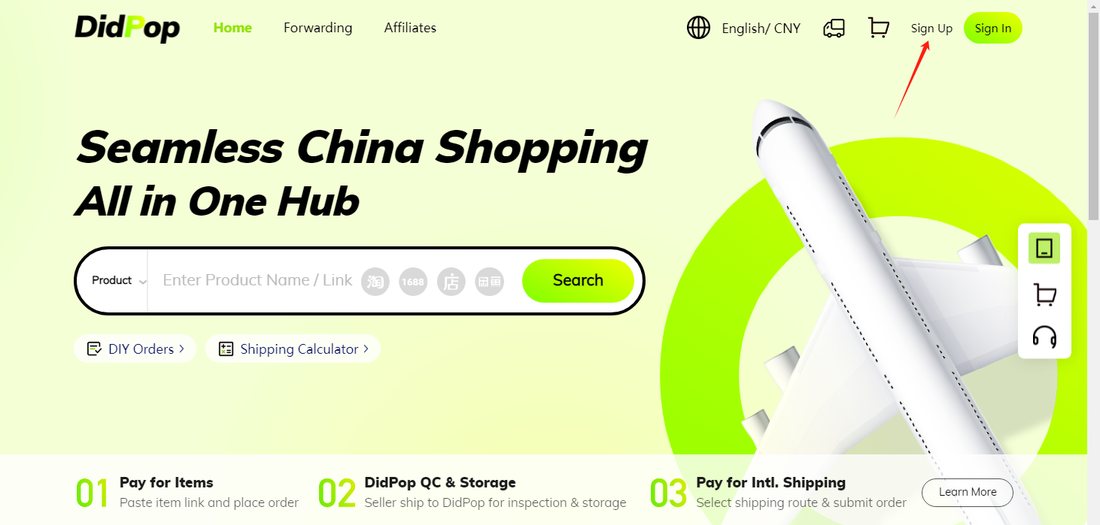
Didpop puts the whole sign-up at under a minute: click Sign Up from the homepage, then the form wants your email, a username you pick, a password, and a one-time code sent to confirm you are real. Nowhere in that flow does it ask for a domestic mobile number. The live registration page sits on a separate subdomain that returned a security challenge to us when we tried to capture it directly, so the screen below is the homepage entry point rather than the form itself; the four fields above plus a terms checkbox are everything the form actually asks for.
Rechecked October 25, 2026: Didpop remains temporarily unavailable. The steps and figures below are an archive of the October 22 help material, not confirmation that orders can be placed today.
Step 2 · Add the item and set your options
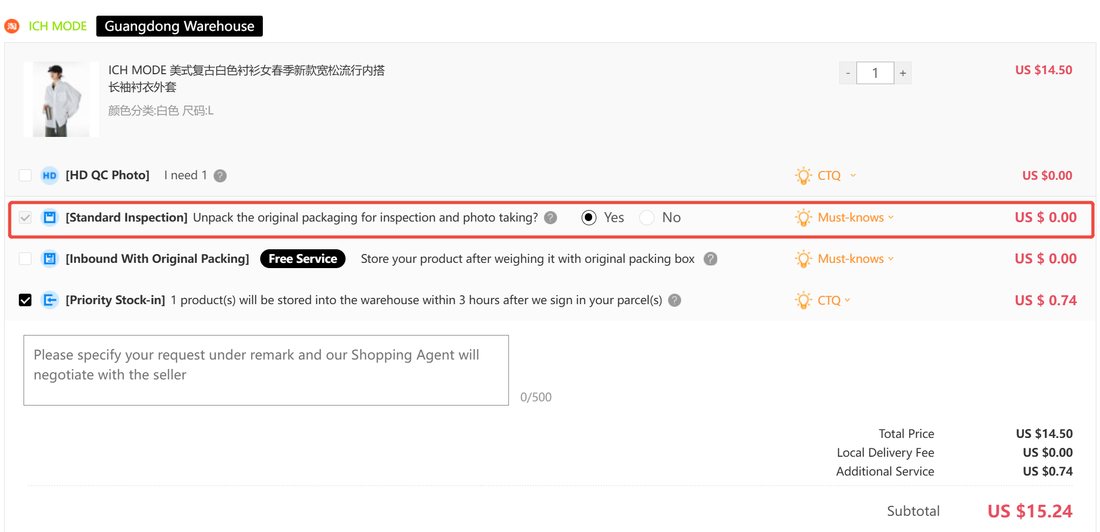
Paste a product link or search by name, then choose quantity, size or colour where the listing offers them. On the order screen, Standard Inspection is switched on by default at no charge; leave it on unless you have a specific reason not to, since it is the free check that catches the wrong colour or a damaged item before it ships onward. A running price breakdown (item total, local delivery fee, any paid add-ons) sits on the right of the same screen before you confirm.
The same screen is where Priority Stock-in sits, a small paid add-on that promises the item gets logged into My Warehouse within three hours of the parcel being signed for, rather than waiting in the ordinary processing queue. It is worth the fraction of a dollar it costs if you are racing a consolidation deadline; it does nothing for order speed on the seller's end, only for how fast the warehouse itself logs the arrival.
Step 3 · Pay for the order
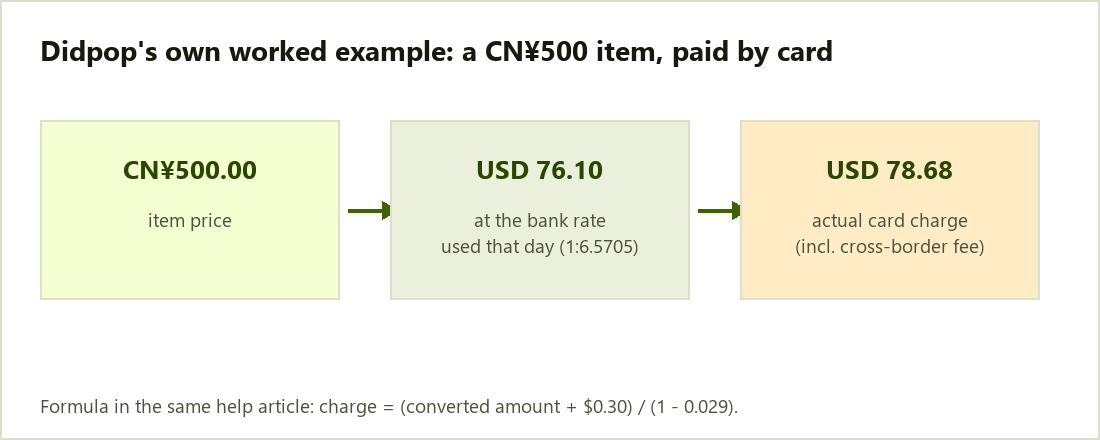
Top up by PayPal or an international card; the charge settles in USD at the bank's live rate, plus a cross-border handling charge. The Fees page works through the exact formula; a quick sense of scale: a 500-yuan item ends up costing just under 79 dollars on the card, roughly three and a half dollars more than the bare currency conversion alone.
Step 4 · Inspection and warehousing
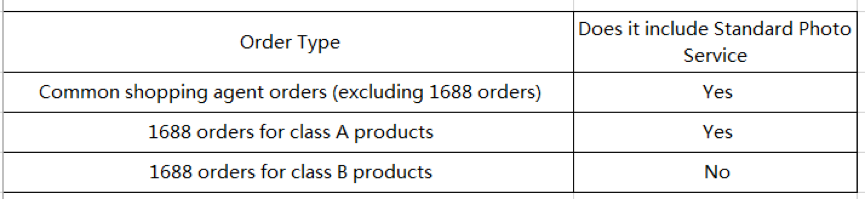
Once the seller ships to Didpop's warehouse, the item is checked under Standard Inspection (style, quantity, colour, size, model, damage) and three standard photos are taken, both free, though whether the photo service applies depends on the order type rather than the item category. The item then shows as stocked in under My Warehouse, which is also when the 90-day free storage clock starts.
This is also the point where a mail-restricted item gets flagged, if it is going to be: Didpop marks it with a dedicated icon inside My Warehouse rather than waiting until you try to ship it to tell you. If several items are arriving on different days and you plan to consolidate them into one shipment, each one starts its own 90-day clock independently from the moment it is logged in, not from the date of the first item.
Step 5 · Pack and submit your shipment
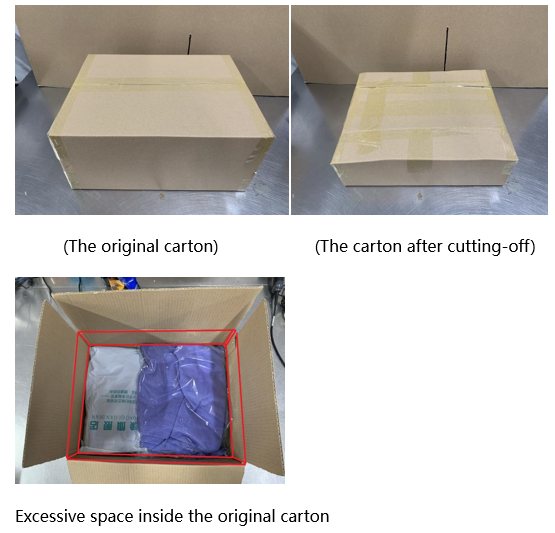
Before you submit a parcel, Didpop's own packing guidance is worth following: an oversized retail carton with air gaps gets trimmed down first, since extra box volume is billed as weight on lines that bill by volume. The same guide covers pressing garments down inside a poly bag rather than shipping them in bulky original retail packaging.
If you are combining several warehoused items into a single shipment, submit the consolidation request before paying freight, not after; the line and rate you are quoted depend on the combined parcel's final dimensions and weight, not on each item's individual listing weight. For anything fragile going into that combined box, this is also the point to add one of the packaging upgrades covered on the Shipping page.
Step 6 · Pick a line and pay freight
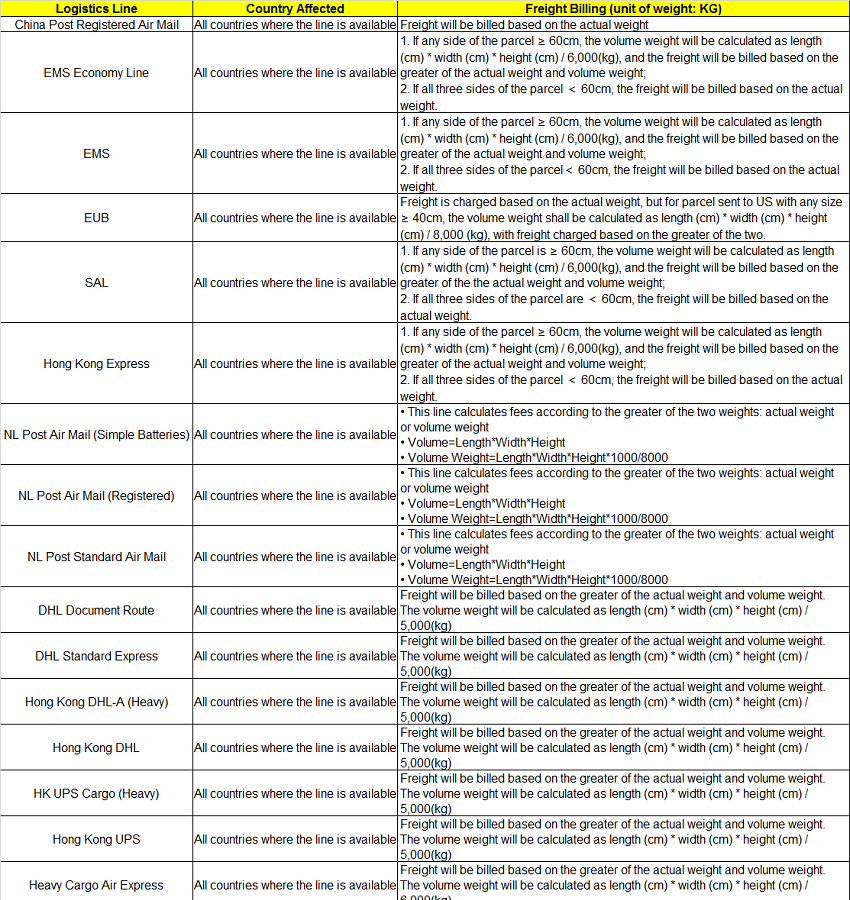
Didpop's rate sheet lists dozens of shipping lines, each with its own billing method; most bill whichever is greater of actual weight or volume weight, but the volume-weight divisor differs by line (6,000, 8,000 and 12,000 all appear). A handful of express and document-only lines bill on actual weight alone. Check the specific line before booking, especially for anything bulky but light.
Didpop's own article on how it collects supplemental payments covers what happens if the parcel's actual weight or dimensions turn out higher than estimated once it is on the scale: you get billed the difference as a supplemental payment rather than having the shipment held indefinitely, so a rough estimate at booking time is not a hard ceiling on the final freight cost.
Step 7 · Receive your parcel and the return window
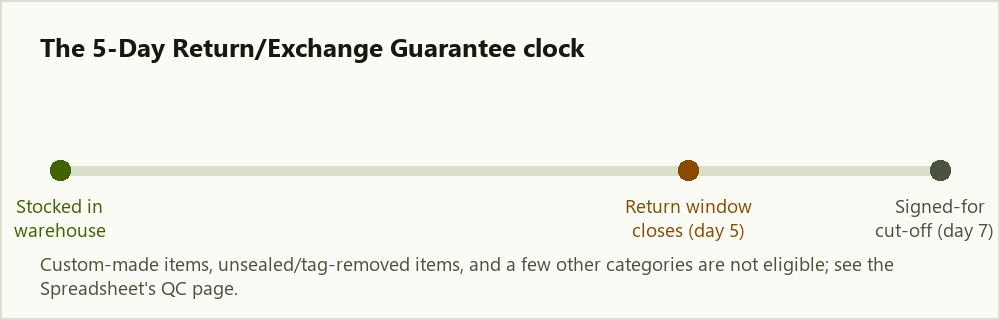
The 5-Day Return/Exchange Guarantee is measured from when the item is marked stocked in at the warehouse, not from your delivery date, and the whole window closes 7 days after sign-in. A list of exclusions applies (custom-made items, tag-removed items, underwear, food and a few others). If you suspect a counterfeit item slipped through, Didpop's complaint path runs through [email protected] with your order and payment evidence attached.