
Home › QC
QC, in Didpop's own terms
Quality control on Didpop runs through two free services and a handful of paid add-ons. Here is what each one actually covers.
Terms you'll run into
QC is shorthand for quality check, the general term for anyone inspecting an item before it ships. On Didpop specifically, the free version of this is called Standard Inspection, and it is paired with a free Standard Photo service that provides three photos per item. GL and RL are not Didpop's own vocabulary; they show up on some other agents as abbreviations for general and random inspection levels, so if you see those letters elsewhere, know that Didpop names its own tiers differently (Standard, Secondary, Detailed).
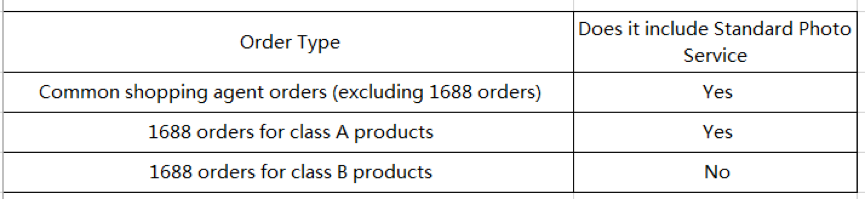
Whether Standard Photo is even included depends on the order type. Didpop's help center draws the line at the 1688 marketplace specifically: ordinary agent orders get the photos, 1688 orders tagged class A get them too, and only 1688's class B listings are left out.
What Standard Inspection actually checks
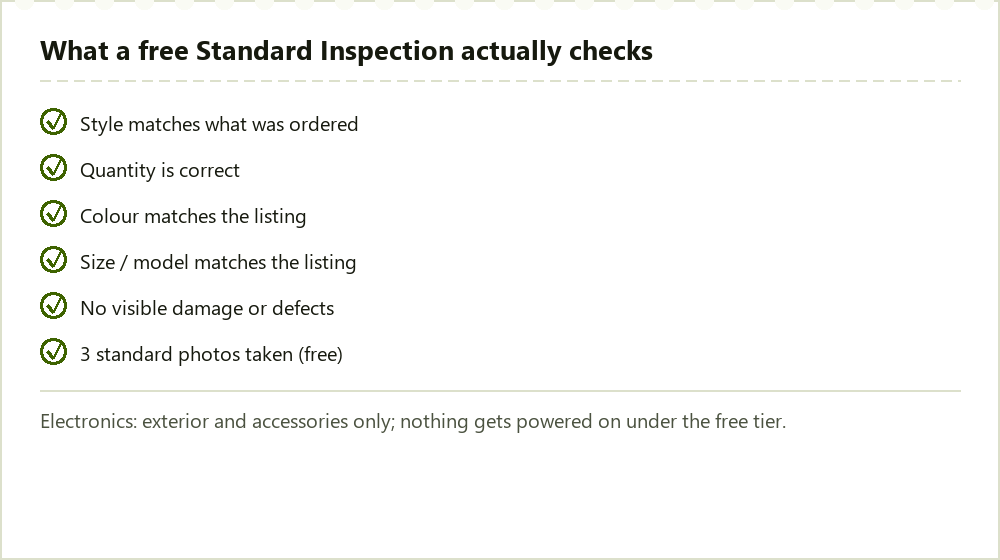
Six things get checked under the free tier: whether the item is on Didpop's prohibited list, whether the quantity matches, and whether colour, size and model line up with what the listing promised, plus a look for any damage, before the three standard photos get taken. If you opted out of inspection when you placed the order, a paid Secondary Quality Inspection is available afterward, once the item is already in the warehouse.
Electronics get a narrower free check: exterior and accessories only, with nothing powered on. If you want the device actually tested, Didpop's help center names a paid add-on for that, listed as inspection of 3C and appliance power.
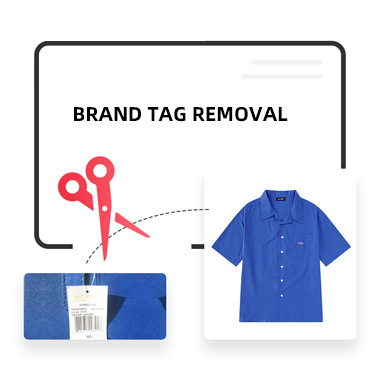
A separate paid add-on worth knowing about is Brand Tag Removal, which Didpop's own help article says can reduce the chance of a parcel attracting customs attention on the way in, but with a real tradeoff: once tags are removed you lose return and exchange eligibility on that item. We are stating that tradeoff exactly as Didpop's help center frames it, not as a tax-avoidance tip.
How to read your QC result before you ship
Once an item is stocked in, it sits under My Warehouse with whatever inspection notes and photos were taken. Mail-restricted items get flagged there with a dedicated icon rather than left for you to discover at the shipping step; see the Shipping page for the category list that icon covers.
If a photo shows damage or a mismatch against the listing, Didpop's Usual Way of Handling Defective Products article is the one to read before you decide whether to request a return, a partial refund, or a discard. That decision window is tied to the same 5-Day Return/Exchange Guarantee clock covered on the Guide page, so check the photos as soon as they post rather than waiting.
Paying for a closer look
If the free tier is not enough, Didpop's help center names several paid inspection upgrades rather than one generic add-on. Secondary Quality Inspection repeats the check after the item is already warehoused, for orders where inspection was skipped at checkout. Detailed Inspection and Detailed Photo go further than the three free standard photos, useful for anything with fine print, stitching detail, or a surface finish that a standard shot would not show clearly. Model Try-on Photos put the item on a person before it ships, which is the closest thing to trying it on yourself.
For electronics specifically, the paid Inspection of 3C and Appliance Power add-on is the only way to confirm a device actually powers on before it leaves the warehouse; the free Standard Inspection on this shelf stops at the exterior and accessories, as covered above. None of these upgrades are required, and none of them change the free Standard Inspection or Standard Photo you already get by default.